
How to Create an Account
If you did not complete a renewal through the system in 2026, you will need to create an account following these steps. We recommend you keep these instructions open in a different tab or browser so you can refer to them through all of the account creation steps.
If you already created your account but forgot the password, please use the forgot password link on the sign-in page.
If you are having problems completing the renewal or have questions, email us with as much detail as possible about your problem to idaho-isb@tylertech.com.
Step 1
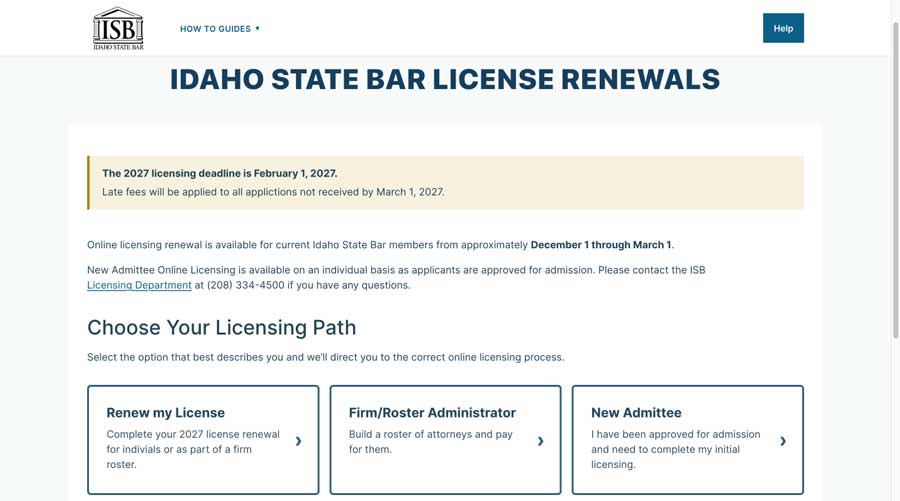
Select the renewal path that applies to you on https://tyleridaho.com/isb/ and you will be directed to the the accessgov.com renewal system where you can begin to create your account.
Step 2
You will be prompted to Create an Account.
Click the “Sign up now” link

Step 3
Enter the email address your ISB Renewal invitation was sent to and click “Send verification code” button.
Please Note: If you would like to have your account tied to a different email than the one that ISB had on file, you will be prompted to update your account and confirm the change within the Access Gov renewal application.

Step 4
Check your email account for the verification code email.
The email will come from msonlineservicesteam@microsoftonline.com. Please check your junk/spam folder if you do not receive the email.

Step 5
Navigate to the browser window that has the account creation screen active.
Enter the verification code from your email and click “Verify Code” button.

Step 6
Type your password in the New Password field and enter it again in the Confirm New Password field.
The password must be between 8 and 64 characters. The password must have at least 3 of the following:
- a lowercase letter
- an uppercase letter
- a digit
- a symbol
NOTE: If you have a Password Manager tool, or store your passwords in your browser, make sure you save your email and password.
Enter your first and last name in the fields and click the “Create” button

Step 7
After logging in, you will see a confirmation that your email is validated. If you have a Member Number tied to your email, you will be able to click on the “Begin License Renewal” button to complete your renewal.
No Member Number tied to your email?
You can update the email address tied to your Member Number by following the instructions on the screen and then continue your renewal.
For more assistance, please see the FAQ Page.